
chartsim: a boat on my desk
A chartplotter needs a moving boat to do anything interesting, and my boat isn’t on my desk. Before I wrote the plotter itself, I wrote a simulator: chartsim. Almost every feature in the last dev note was first tested against it, from following the boat to warnings about rocks ahead. This note covers what it does, how it’s built, and the bugs it shook out.
What it does
chartsim is a single program that runs on my Windows PC. It opens a web page with a map, and the boat is a marker on it:
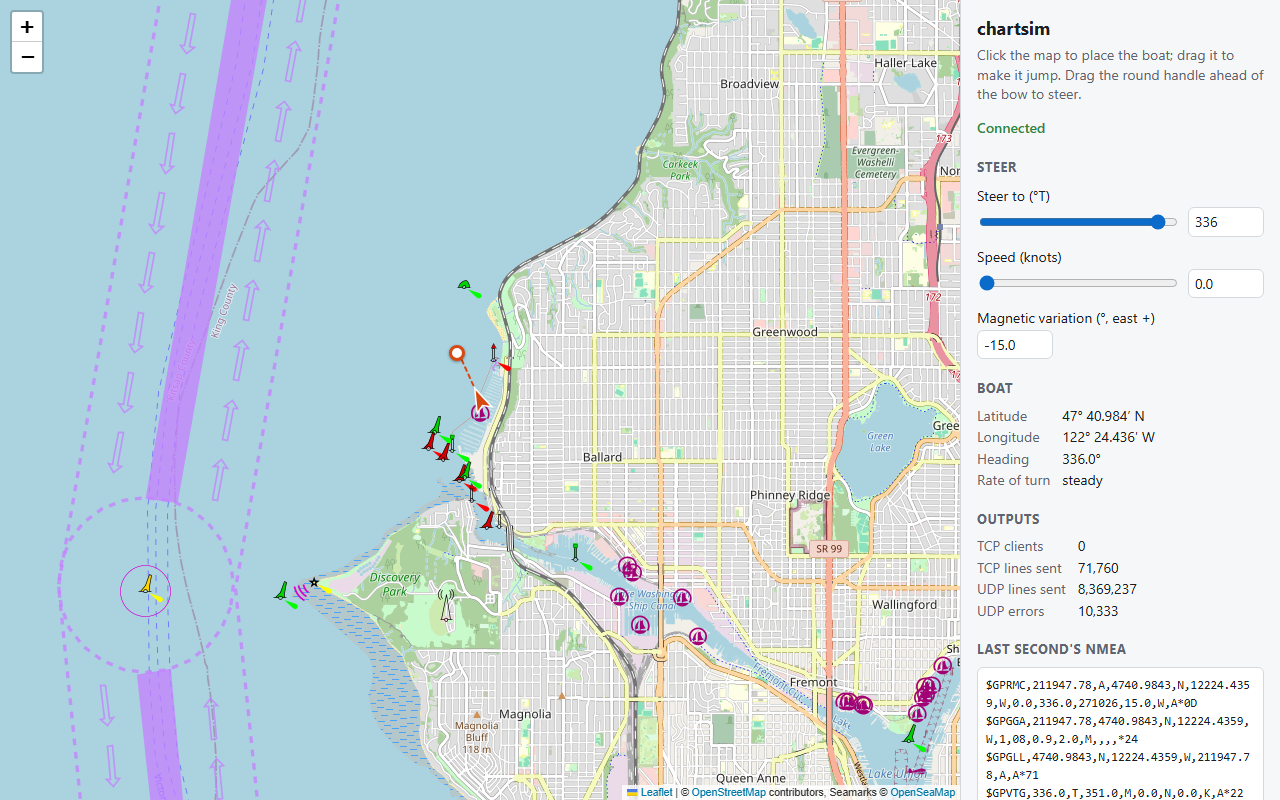
- Place the boat with a click, anywhere in the world. Dragging it somewhere else simulates a sudden position jump, which is a useful test in itself.
- Steer by dragging the bow. A small handle sits ahead of the boat; drag it round and the boat turns towards the new heading, with a dashed line showing the heading you asked for. Speed is a slider.
- Boat data on the network. Once a second it sends what a GPS and a compass would: position, speed and course over ground, heading, date and time, and satellite status. It sends this as NMEA 0183, the plain-text sentence format most marine electronics speak, in nine sentence types (RMC, GGA, GLL, VTG, HDT, HDG, GSA, GSV, ZDA).
- Two ways to listen. A TCP server on port 10110, the port marine apps commonly use, and a UDP broadcast on the same port, so any device on the network hears the boat without being told where chartsim is.
That’s enough to drive OpenWater on the Pi, the panel PC and Windows over Wi-Fi, all at once. It also checks that the data isn’t only understood by my own code: OpenCPN followed the simulated boat in the first test, and a Navionics app picked up the broadcast by itself.
How it’s built
chartsim is written in Rust, like OpenWater’s core, and it’s small: about 1,200 lines of Rust and 300 of HTML and JavaScript. It came right after the NMEA parser, and it was where I learned async Rust: a self-contained program to get it wrong in before the core depended on it.
Browser (Leaflet map)  ⇄  WebSocket, JSON  ⇄  chartsim (Rust, Tokio)
                                                ├─ boat model, 10 times a second
                                                └─ NMEA out: TCP server + UDP broadcast
One binary, nothing to install. The web page is compiled into the program, so there are no loose files and the interface works offline. Only the map tiles come from the internet: OpenStreetMap with the OpenSeaMap seamark layer on top, drawn by Leaflet. No API key, no billing account.
Async with Tokio. The boat model, the TCP server, each connected client, the UDP sender and the web server are separate async tasks on Tokio. Each second’s sentences are built once and handed to every output through a broadcast channel, so a slow client can’t hold up the others. The web side uses axum, with serde turning the state into JSON.
The same API shape as the core. OpenWater’s core talks to the apps through a state stream plus commands: the app receives the state as it changes and sends commands back, and never reaches into the core’s internals. chartsim uses the same shape: the browser gets the boat’s state five times a second over a WebSocket and sends commands like {"cmd":"steer","heading_deg":90}. That also makes it easy to steer from a script, which is how I run repeatable tests: a few lines of code can put the boat on a course and change its speed while I watch the plotter.
A boat that turns like a boat. Steering sets a target heading, not the heading itself. The rate of turn builds up as if the helm were being put over, holds at most 8 degrees a second (a yacht tacking through 90 degrees takes about 15 seconds), and eases off so the boat settles on the new heading without overshooting. Position comes from dead reckoning ten times a second. It looks right on the plotter, and it exercises the code that smooths course and speed the way a real boat does.
The core’s own encoders, checked both ways. chartsim builds its sentences with the encoders in OpenWater’s NMEA crate, and the tests parse every line back and check the values survive the round trip. That catches a lot, but an encoder and a decoder written by the same person can share the same misunderstanding. So the other half of the check is independent receivers: OpenCPN and the Navionics app reading the same stream.
What it found
The simulator’s real value turned out to be the bugs it surfaced in the plotter, not in itself.
Following the boat kept the Pi busy. With chartsim’s boat moving, the mouse on the Pi acted strangely, and the app was using 83 % of a core. Counting frames showed the cause: every position update started an 800 ms camera glide, so the map was animating most of the time, and the map engine repainted every frame while it waited to re-place labels. Stepping the camera instead, and drawing the boat as an overlay, brought following down to about 8 %.
The boat off Africa. With chartsim’s boat stopped near Seattle, the Pi once showed it off the coast of Africa, at 0° N 0° E. The map engine’s camera glide reads the camera back as it starts, and before the map is fully set up it does nothing at all, so at start-up the camera could stay at its default position, and the boat drawn in the middle of the screen with it. A stopped boat never sent the move that would have fixed it.
Two boats taking turns. On the panel PC, chartsim’s broadcast and the real USB GPS were both active, 4 km apart. With equal priority, the plotter switched between them at every sentence and redrew 40 times a second. Now the source in charge stays in charge while its data is fresh.
Broadcasts that went nowhere. chartsim originally sent its UDP broadcast to 255.255.255.255. On Windows, that leaves through a single network adapter, and with WSL running it picked WSL’s virtual one, so the Pi on Wi-Fi heard nothing. It now sends to each network’s own broadcast address.
Bridges and rocks on purpose. Some tests are just a matter of steering the boat somewhere: under the Ballard Bridge in Seattle (29 ft closed) with a 49 ft mast set in the app, to check the clearance warning; or off West Point with a second chartsim boat heading 080, to check the dangers-ahead corridor.
What’s next
I’m recording a video of chartsim steering the boat with OpenWater following it side by side; I’ll link it here when it’s up.
So far chartsim is what the first test needed. The design has much more, and most of it will come as OpenWater needs it:
- NMEA 2000 and Signal K outputs, for the second release’s data sources.
- Faults on demand: GPS dropouts, corrupted checksums, a stale heading, a drifting clock, bursts of data, to test how the plotter copes.
- Wind, current and AIS targets, for set and drift and for collision warnings.
- Scenarios and a headless mode, so automated tests can replay a passage without a browser.
- GPS imitations: a virtual USB GPS and gpsd, and a helper for an Android phone’s built-in GPS, to test the paths a real GPS takes.
As always: OpenWater is not a certified navigation system. Don’t rely on it as your only means of navigation, and keep a lookout.